People
People holds everyone you know, with what you want to remember about them.
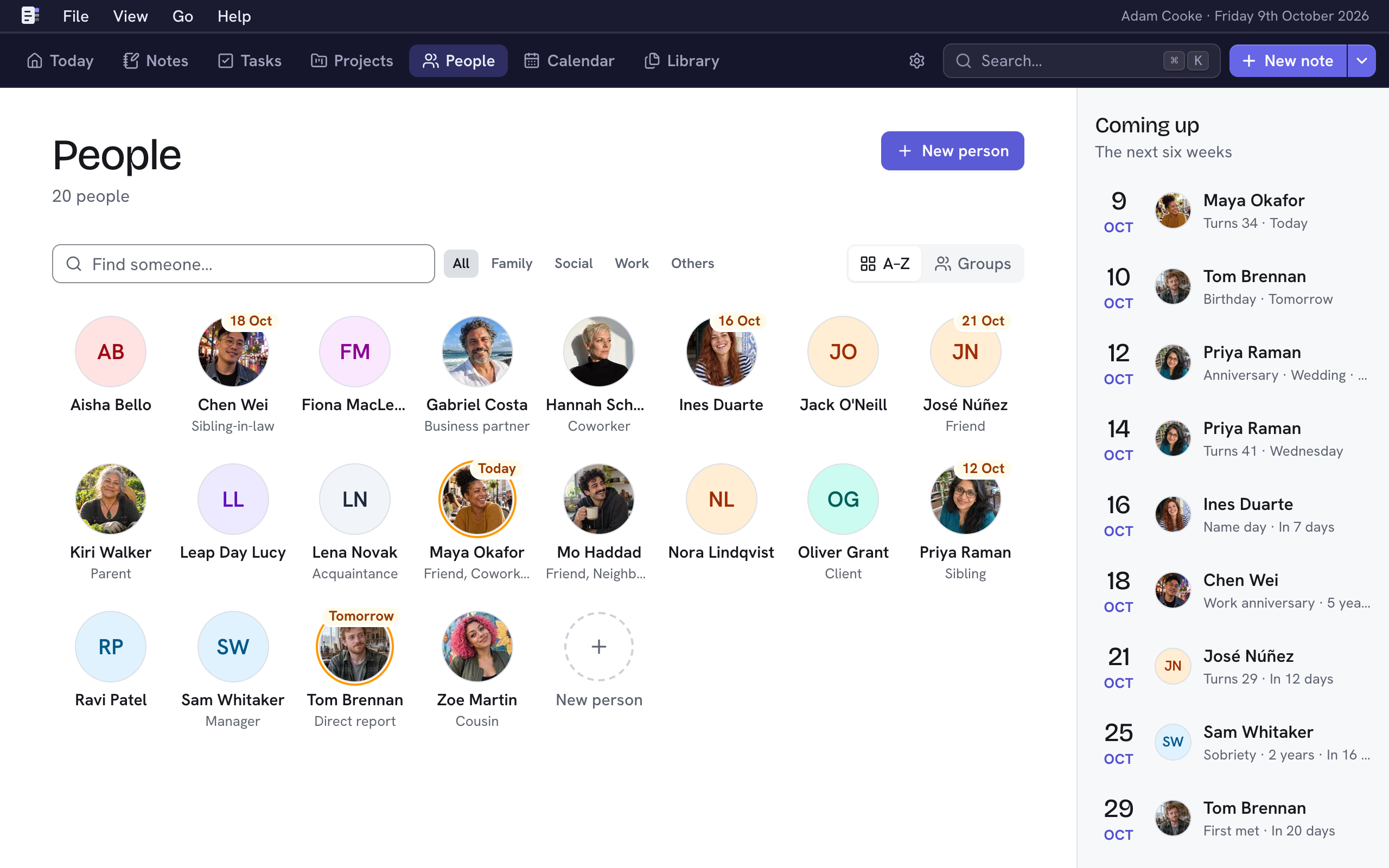
People shows everyone as a face. Open someone to see their notes, facts, tasks, documents and connections, with their details beside them. To get here from anywhere, press G and then P.
Add a person
- Choose New person, or press N. From anywhere, you can press ⇧P.
- Type their name.
- Choose Add person, or press ⌘↵.
Their page opens, ready for more details. You can also add someone while mentioning them in a note or connecting them to someone else.
Find someone
- Type in Find someone…, or press F to get there. It matches names, aliases and how people relate to you. ↵ opens the first match, and Esc clears the field.
- To see only some people, choose a group: All, Family, Social, Work or Others. A person's group comes from their Relationship to you.
- A–Z lists everyone by name, and Groups puts them under each group.
- Nifty remembers both choices on every device you use.
A face with a date on it has a key date in the next two weeks. Coming up, beside the faces, lists the next six weeks. On a phone, the next two weeks appear above the faces.
A person's page

The tabs hold what's linked to the person.
- Notes lists the notes that mention them. Add a note about… starts a new one.
- Facts holds the small things you know about them, such as how they take their coffee. See Facts.
- Documents shows the documents linked to them, each with its first page. Choose one to view it, or its ⋯ for more. Right-click a document to open its menu where you clicked. Upload files or Link existing… adds more, and so does dropping files anywhere on their page. A document opens over the page, and Esc brings you back. See Library.
- Connections shows the people they know. See Connections.
- Tasks lists the tasks you've delegated to them, then the ones they've completed. ⇧T adds a task delegated to them. See Delegate a task.
- Upcoming meetings lists the meetings from your calendars that they're invited to, day by day, for the next 60 days. Choose a meeting to see its details and Join it.
Each of the details on the right has a + or a pencil, and a key.
| Section | Key | Holds |
|---|---|---|
| Relationship to you | Y | What they are to you: friend, sibling, manager… This sets their group on People. Each one is a connection between you and them. |
| Work | O | Job titles and companies. See Work. |
| Key dates | D | Birthdays, anniversaries and more. See Key dates. |
| Details | A | Email addresses, phone numbers, links and their time zone. Choose a contact detail to change or remove it. Change the time zone with Edit person. |
| Projects | The projects they're part of. |
Change or delete a person
- Edit person (E) changes their name, aliases, photo and time zone. Type a city or a country to find the time zone. When their time isn't the same as yours, their page shows what time it is there.
- Aliases are other names you call someone, such as Mum, Dad or Spud. Separate them with commas. They show under the person's name, and searching for one finds them. You can also mention them by an alias in a note.
- The bin icon beside it, Delete person, deletes them along with their key dates, details, facts, connections and tasks. Notes are kept, and mentions of them become plain text. You can undo this for 10 seconds.
Your own page
You're a person in Nifty too. You can open your page in any of these ways.
- Choose your name at the top right, beside the date. On a phone, your name is in the menu under Go.
- In the Mac app, choose Go → My page.
- Search for me or My page.
- Choose Settings → My details, and then choose Go to my page.
Your page holds your contact details, work, key dates and facts, the notes and documents about you, and your connections. You can mention yourself in a note with @me. On a project, add yourself under People with your role, and the role appears on the project's card.
Add your email addresses to your page. Nifty uses them to tell which meetings you're in. Without them, it can recognise you in a meeting only by your name.
Your page has no Tasks tab, because you can't delegate a task to yourself. It also has no Upcoming meetings tab, because your meetings are in the calendar. You aren't among the faces on People, and you can't be deleted. Your birthday and other key dates don't appear in Coming up.
To change your name, photo and time zone, choose Edit my details (E) on your page. Nifty uses your time zone for every date and time, so changing it changes what "today" is.